


Does a hotspot cost money? Usually not by itself. Turning on the hotspot on your phone is free on most US phone plans. But every device you connect uses your plan's data, and many plans only give you a set amount of high-speed hotspot data each month. So using your hotspot can cost extra if you go over that amount, buy a hotspot add-on, or use it abroad on roaming. Here's how it works with your carrier, at home and when you travel.
Does using a hotspot cost money?

The hotspot feature (also called Personal Hotspot, Mobile Hotspot or tethering) lets your phone share its mobile data with your laptop, tablet or another phone. Your phone becomes a small Wi-Fi network.
- Turning it on is usually free. Verizon says many of its plans let you use Mobile Hotspot "for no additional monthly charge" (Verizon: Mobile Hotspot FAQs).
- The data isn't free. Everything your connected devices do counts toward your phone plan's data.
- Many plans have a hotspot limit. Even with unlimited data, you often get a fixed amount of high-speed hotspot data. After that, your hotspot slows down until your next billing cycle.
- Some plans don't include it. Apple says Personal Hotspot needs a carrier that supports it and that additional fees may apply (Apple: Personal Hotspot). Google says some carriers limit or charge extra for tethering (Android Help: hotspot and tethering).
When do you get charged for using your hotspot?
Using your hotspot only adds to your phone bill in a few cases:
- You buy more hotspot data. Carriers sell add-ons or passes when your included hotspot data runs out.
- You're on a plan with limited data and your carrier charges for extra data once you pass your limit. Check your plan's terms.
- Your plan doesn't include hotspot and you need an add-on or a different plan to use it.
- You use it abroad. Roaming data, including hotspot data, is charged by your carrier's international plan or roaming rates.
- You use a separate hotspot device, like a portable Wi-Fi router. It needs its own data plan.
If none of these apply, using your hotspot doesn't increase your phone bill. It just uses your data faster.
Hotspot on US carriers: what's included
Here's what the biggest US carriers say on their own support pages, checked in October 2026. Plans and allowances change, so check your own plan in your carrier's app.
Verizon
- Unlimited Ultimate: up to 200 GB of premium hotspot data a month, then unlimited at lower speed.
- Unlimited Plus: 30 GB of premium hotspot data a month, then unlimited at lower speed.
- Simplicity Plan: 10 GB of hotspot data.
- You can buy hotspot perks on some plans. See your allowance in My Verizon (Verizon).
AT&T
- AT&T Elite 2.0: 250GB hotspot data.
- AT&T Premium 2.0: 100GB hotspot data.
- AT&T Extra 2.0: 50GB hotspot data.
- AT&T Value 2.0: 3GB hotspot data.
- When it runs out, your hotspot slows to a maximum of 128Kbps unless you buy more hotspot data (AT&T: Use your device's hotspot).
T-Mobile
T-Mobile says Mobile Hotspot is included with many plans, such as Experience More, Experience Beyond and Go5G. The amount of high-speed hotspot data depends on your plan. When you use it up, your hotspot speed is reduced until the end of your billing cycle. You can add Mobile Hotspot Data Passes on Go5G and Experience plans (T-Mobile: Mobile Hotspot).
UScellular
T-Mobile closed its purchase of UScellular's wireless business on August 1, 2025. T-Mobile says UScellular customers stay on their existing plans for now and can later move to a T-Mobile plan (T-Mobile Newsroom). So the cost of using your hotspot on UScellular depends on the plan you have. Check your hotspot allowance in your account, or ask before you switch to a T-Mobile plan.
Consumer Cellular
Consumer Cellular says its plans support mobile hotspot if your phone can do it. It says hotspot use usually counts toward your monthly data, and whether it costs extra depends on your plan (Consumer Cellular: using a mobile hotspot).
Does hotspot cost money with unlimited data?
Not usually, but "unlimited" rarely means unlimited high-speed hotspot. Most unlimited plans above come with a hotspot allowance. Once you use it, your hotspot keeps working but gets much slower. You only pay more if you buy an add-on or upgrade your plan. More on this in do unlimited data plans without throttling exist?
Does using someone else's hotspot cost money?
Not for you. If you connect to a friend's hotspot, the data comes from their plan, not yours. Verizon explains that data used by a connected device is applied to the phone plan that shares the hotspot. So if you let someone use your hotspot, it uses your data. Set a strong Wi-Fi password and only share it with people you trust.
Can I use my hotspot internationally?

Often yes, but this is where hotspot can get expensive. Abroad, your phone uses roaming data, and so does every device connected to your hotspot. Verizon, for example, says you can use Mobile Hotspot outside the US on its 4G LTE network, and data charges apply according to your international travel plan or roaming rates (Verizon).
Before you travel:
- Check your carrier's international plan or pass and whether it allows hotspot. Ask your carrier if it isn't clear.
- Check how much data it includes. A laptop can use much more data than your phone, because of updates, cloud backups and video calls.
- Know your roaming settings. Here's how to avoid roaming charges.
Using a travel eSIM as your hotspot
Another option is a data-only travel eSIM. You add it to your phone next to your usual line and choose it for mobile data. Your phone can only use one line for data at a time (Apple: Dual SIM), so your hotspot then shares the travel eSIM's data, not your home plan. Only do this if the travel plan allows hotspot. Your phone also needs to be unlocked and eSIM compatible.
Our Europe, Mexico and Canada plan pages say hotspot and tethering are allowed. That means you can share the plan's data with your laptop or a travel partner's phone. A hotspot uses data quickly, so a bigger plan is a good idea if you'll connect a laptop.
Europe, Mexico and Canada plans shown · data-only eSIMs, no phone number · Find the eSIM for your destination
How to turn on your hotspot
iPhone
- Go to Settings > Personal Hotspot (or Settings > Cellular > Personal Hotspot).
- Turn on Allow Others to Join.
- Tap Wi-Fi Password to see or change the password. It needs at least eight characters.
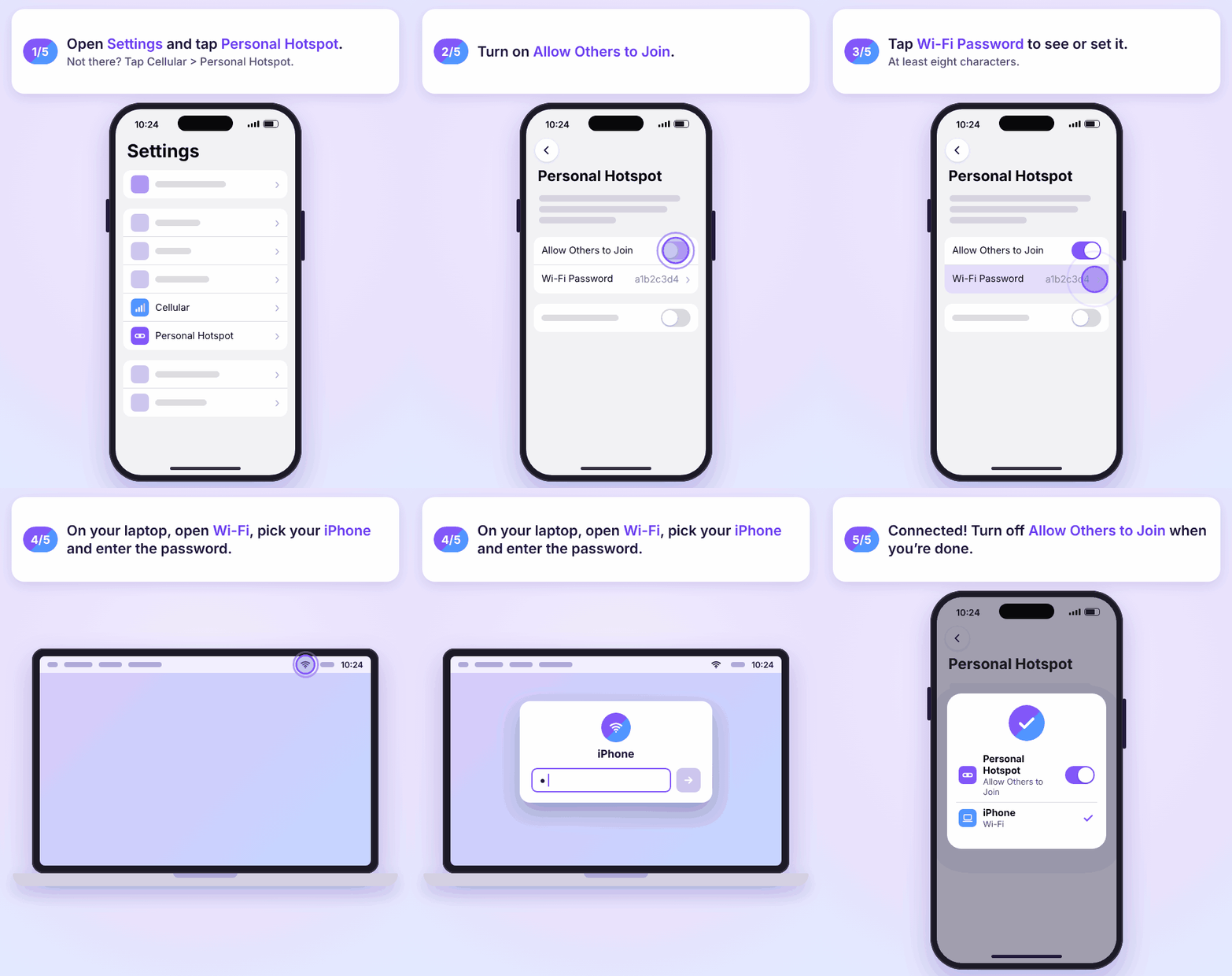
If Personal Hotspot is dimmed or missing, check that Cellular Data is on in Settings > Cellular. If it still doesn't show, ask your carrier if your plan includes it (Apple).
Android
- Swipe down from the top of the screen.
- Tap Hotspot. If you don't see it, edit your Quick Settings and add it.
- Connect your other device to your phone's Wi-Fi network.
Menu names can be a little different on Samsung and other phones (Android Help). More details in what tethering is and how to enable it.
How to keep hotspot costs down
- Know your allowance. Check your hotspot data in your carrier's app (My Verizon, myAT&T or T-Life).
- Track your data. See how to check your data usage on iPhone or Android. Apple and Google both say your carrier's count is the one that matters for your bill.
- Set a data warning on Android in your SIM settings, so you get a notice before you hit your limit (Pixel Phone Help: manage data usage).
- Pause big downloads on your laptop. Stop system updates, cloud backups and video in HD while you're on your hotspot.
- Turn off the hotspot when you're done. It also saves battery.
- Use trusted Wi-Fi when you can, especially abroad. Here are more ways to reduce data usage abroad.
Visiting the US from Canada or somewhere else? Our USA plan page says all its USA eSIM plans allow hotspot sharing, so you can share the data with your laptop on the road.
FAQs
Does hotspot cost money?
Turning on your hotspot is usually free. It uses your plan's data, and many plans include a set amount of high-speed hotspot data. You only pay more if you buy extra hotspot data, go over a limited plan, or use it abroad on roaming.
Does using hotspot cost extra?
Not on most US phone plans that include hotspot. It costs extra if your plan doesn't include hotspot, if you buy an add-on or pass, or if roaming charges apply.
Does using a hotspot increase your phone bill?
Only if you go past what your plan includes and pay for more, or if you use it abroad. Otherwise it just uses up your data faster.
Do you get charged for using hotspot if you have unlimited data?
Usually not. Most unlimited plans include a hotspot allowance. After that, your hotspot slows down instead of costing more, unless you choose to buy more hotspot data.
Does sharing your hotspot cost money?
Sharing doesn't cost anything by itself, but every connected device uses your data. If several people connect, your hotspot allowance runs out faster.
Can I still call and text while my hotspot is on?
Yes. T-Mobile, for example, says you can still make and receive calls and texts with Mobile Hotspot turned on. Regular SMS texts don't use mobile data, but iMessage, RCS chats and apps like WhatsApp do. Read more in does texting use data?
Can I use my hotspot internationally?
Often yes, through your carrier's roaming or international plan, and roaming charges may apply. A travel eSIM that allows hotspot is another option.